CAT6
May 03, 2026
Cat6 vs Cat6A: Which Cable for Your Next Commercial Install?
You are halfway through quoting a commercial fit-out. The client asks the question you knew was coming: "Cat6 will be fine for this, won't it? It's cheaper." You hesitate. The runs are long, the comms room sits next to the main switchboard, and the spec sheet uses the word "future-proof" three times. Pick wrong here and you are not just losing margin — you are coming back in twelve months to re-pull every cable through a finished ceiling.
There is already a thousand articles online explaining the difference between the two cables. This is not one of them. This is the practical decision rule for a working cabler quoting a commercial job in Australia today.
The Difference That Actually Matters On Site
Forget the bandwidth charts for a moment. On a commercial site, two things separate Cat6 from Cat6A in a way you can feel — and both of them show up only after the cable is in the ceiling.
1. Alien crosstalk on long runs
Cat6 can carry 10 Gigabit, but only over short distances — and only when it is not bundled tightly with other Cat6 runs in a tray. Push it past about 37 metres bundled, and signals from neighbouring cables start bleeding into each other. This is alien crosstalk (AXT), and it is the single biggest reason Cat6 fails certification on commercial 10G installs.
Cat6A is engineered specifically to suppress AXT — tighter twist rates, larger conductor separation, and on shielded variants, a foil or braid that kills the interference outright. That is why it is the standard for any commercial 10G run, regardless of whether the client plans to switch to 10G this year or in five years' time.
The 37-Metre Rule (technical reality):
Cat6 at 10G: Reliable only to ~37m when bundled (55m unbundled, lab conditions)
Cat6 at 1G: Full 100m channel — no problem
Cat6A at 10G: Full 100m channel, bundled or not — guaranteed to AS/NZS 3080
AXT testing: Required for Cat6A certification, not specified for Cat6
Bundled cable count: AXT scales with bundle density — a 24-cable run is far worse than 6
Already know the job needs Cat6A?
The full 305m Cat6A range in Australian stock — U/UTP, F/UTP, S/FTP, gel-filled and external. ABN invoicing, same-day dispatch before 2pm AEST, free shipping over $300.
Shop Cat6A Cable Rolls →
2. Shielding in high-interference environments
Commercial sites are noisy. Cable trays running parallel to power conduit, comms rooms sharing a wall with the main switchboard, plant rooms with VSDs and contactors firing all day — all of it dumps EMI into your data cables. Unshielded Cat6 will pick up that noise and your throughput will tank long before anyone calls in a fault.
For these environments you want shielded Cat6A — F/UTP for general commercial work, S/FTP where the interference is severe (data centres, near major plant). The shield does the heavy lifting, the AXT performance does the rest.
Cat6 vs Cat6A — Quick Comparison
Specification
Cat6
Cat6A
Max speed
1 Gbps (100m) / 10 Gbps (37m bundled)
10 Gbps (full 100m)
Max distance at 10G
~37m bundled
100m — guaranteed
Alien crosstalk (AXT)
Not tested — fails in dense bundles
Engineered to suppress AXT
Shielding options
U/UTP only (standard)
U/UTP, F/UTP, S/FTP
Cable diameter
~6mm OD — fits tight conduit
7–8mm OD — needs larger conduit
Typical cost (305m roll)
Lower — good for budget installs
15–25% more — worth it for commercial
AS/CA S008 compliance
Category C channel
Class EA channel — commercial standard
Best for
Residential, short runs, retrofit, voice/CCTV
Commercial, long runs, 10G, PoE++
The Decision Rule (Keep It Simple)
When you are sitting in front of a quote and the client wants a straight answer, run the job through this. It is not theory — it is what stops you driving back out for a callback.
Spec Cat6A — no question — when:
✓ It is a commercial fit-out (offices, retail, education, healthcare, government)
✓ Any single run is over 37 metres
✓ Cables run near electrical conduit, switchgear, or plant
✓ The client has 10G, Wi-Fi 6E/7 access points, or PoE++ devices in scope — now or in the next 5 years
✓ The contract or specification calls for AS/CA S008 compliance
✓ The cable is going somewhere you cannot easily get back to
When Cat6 is still the right call:
Cat6 is not dead. There are jobs where speccing Cat6A would be over-engineering and the client would be right to push back on the price.
Residential and small home office runs under 37 metres
Small-business fit-outs where 1G is the ceiling and budget is tight
Retrofit work where existing conduit cannot fit Cat6A's 7–8mm OD
Voice runs, CCTV at standard PoE, point-of-sale and alarm cabling
Underground or external runs where the right tool is gel-filled or external-rated Cat6 (Cat6A external options exist but are limited)
AS/CA S008 — The Compliance Bit You Cannot Ignore
AS/CA S008 is the Australian customer cabling standard, sitting alongside AS/NZS 3080 for performance. For new commercial builds and major refurbishments, the project specification will almost always call out a minimum cable category. Increasingly that minimum is Cat6A.
If your contract specifies Cat6A and you install Cat6 to save margin, three things happen — and none of them are good. The site fails certification when the head contractor's tester comes through. You are non-compliant against the contract, which puts you on the hook for the rectification. And if it is a Defence, education, or government job, you have just put your prequalification in jeopardy.
Compliance warning — read your spec sheet:
Watch for: "AS/CA S008", "AS/NZS 3080", "Class EA channel", "10GBASE-T support"
Class EA channel = Cat6A cable, connectors and patch leads. Mixing Cat6 components with Cat6A cable will fail certification
Government and Defence work increasingly mandates Cat6A as the minimum — confirm before quoting
Head contractor testing uses a Fluke DSX or equivalent — there is nowhere to hide a Cat6 cable trying to pass as Cat6A
If in doubt: price the job in Cat6A and walk the client through why. Margin lost on a callback is far worse than margin lost on a quote
Winning the "Future-Proof" Conversation
Every cabler has had this conversation. The client looks at the line item, sees the gap between Cat6 and Cat6A, and says some version of "we don't need 10 gig — Cat6 will do." Here is how to answer it without sounding like you are upselling.
Frame it as the cost of the cable, not the speed of the network. The client is buying installed infrastructure that will sit in their ceiling for 20–25 years. Switching gear gets replaced every 5–7 years. Wireless access points get replaced every 4–5. The cable is the only thing in the network that does not get touched. Speccing Cat6A adds maybe 15–25% to the cable cost on a typical fit-out — which works out to a small fraction of the total job once you factor in labour, terminations, patch panels, racks and certification.
Make the labour argument. The cost of pulling a cable is the labour, not the spool. If you have to come back in eight years and re-cable the building because Cat6 cannot carry the next generation of access points, the labour bill alone will dwarf what they "saved" today.
Use the PoE angle. Wi-Fi 6E and Wi-Fi 7 access points draw more power than the 802.3at standard (PoE+) Cat6 was designed around. PoE++ (802.3bt, up to 90W) generates real heat in the cable jacket. Cat6A's larger conductors handle that heat properly; thin Cat6 conductors under continuous high PoE load will degrade and start producing errors. The client does not need to know the standard numbers — they just need to know "your Wi-Fi will work properly in five years."
Pick The Right Cat6A For The Job
Once you have decided on Cat6A, the next call is the construction. Get this right and certification is a formality. Get it wrong and you have over-spent on shielding the job did not need, or under-spec'd a cable that is going to fail in a noisy environment.
Cat6A construction — quick reference:
U/UTP (unshielded): General commercial offices, classrooms, retail. Easiest to terminate, lowest cost. LSZH jacket for indoor riser and plenum routes.
F/UTP (foil shield): Commercial sites with moderate EMI — near power runs, lift shafts, plant rooms. The default upgrade when you want extra insurance without the cost of full S/FTP.
S/FTP (foil + braid): Data centres, healthcare imaging suites, industrial sites with VSDs and motors. Maximum shielding, maximum AXT margin.
Gel-filled U/UTP: Underground conduit, sub-floor where moisture is a risk. The gel blocks water ingress and protects the conductors.
External (above-ground) S/FTP: Outdoor runs between buildings, pole-to-pole, exposed risers. UV-stable jacket plus full shield.
Quoting a job that needs S/FTP?
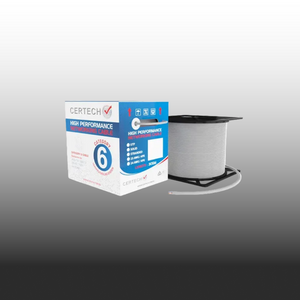
305m Cat6A 10G S/FTP Cable Roll
Double-shielded S/FTP with foil on every pair plus an overall braid, LSZH jacket, solid core with strength member and drain wire. The construction this article just described — in stock in Australia, dispatched same day.
View the Cat6A S/FTP Roll →
AU stock • ABN invoicing • Same-day dispatch before 2pm AEST • Free shipping over $300
Cost Reality Check
The price gap between Cat6 and Cat6A is real — but it looks different once you factor in the full job.
$ Upfront cable cost: Cat6A adds roughly 15–25% to the cable line item on a typical commercial job. On a 20-drop office install using 4 x 305m rolls, that difference is a few hundred dollars — not thousands.
⚒ Labour cost is the same: Pulling, terminating, and certifying Cat6A takes the same time as Cat6. The cable itself is the only cost difference at install time.
📅 Long-term value: Commercial cabling stays in the ceiling for 20–25 years. Network gear turns over every 5–7 years. The cable outlasts three generations of switches — spec it for the third generation, not the first.
⚠ When to upgrade existing Cat6: If a client is doing a major fit-out, floor expansion, or full network refresh — upgrade now. Spot-replacing individual runs in an existing Cat6 installation is rarely worth it unless you are adding 10G uplinks or the current runs are failing certification.
Bottom Line
If you are quoting a commercial fit-out in Australia in 2026, Cat6A is the default. The runs are too long, the PoE loads are too high, the compliance environment is too tight, and the cost of being wrong is too expensive. The decision is not "Cat6A vs Cat6" anymore — it is "Cat6A or a callback."
Cat6 still has its place — short runs, residential, retrofit, voice and CCTV. But for a commercial install where the client has any expectation that the network will still be running 10 years from now, you spec Cat6A, you walk them through why, and you charge accordingly.
Ready to order? SparkyZone has it in stock.
Australian stock, ABN-invoiced, same-day dispatch before 2pm AEST, free shipping over $300. Full Cat6A range — U/UTP, F/UTP, S/FTP, gel-filled, and external variants in every colour you need for a commercial fit-out.
Shop Cat6A Cable Rolls → Shop Cat6 Cable Rolls →
Trade account? Email sales@sparkyzone.com.au for project pricing on multi-roll orders.
Read article