









News

Network Cable Tester Buying Guide Australia (2026)
A failed link on installation day costs more than any tester on the market. Whether you're certifying a 200-drop Cat6A commercial build or chasing a dead port in a school comms room, the right network cable tester tells you exactly what's wrong — and exactly what's right — before the client walks in. The wrong one leaves you guessing. This guide breaks down the three tester tiers used by Australian cablers and IT installers, maps them to real use cases, and shows you which Platinum Tools units SparkyZone carries — with live prices from Australian stock. Quick answer: Which tester do you need? Continuity tester (~$150–$350): Residential, small commercial, fault-finding. Confirms all 8 conductors are intact and correctly wired. Verification tester (~$340–$540): Commercial installer. Confirms the cable will carry data — length, wiring map, tone tracing, coax. No formal certification. Speed certifier ($3,000+): Structured cabling contractors, TIA-568 sign-off, government and education projects. Produces a pass/fail report against speed class (e.g. 10GBASE-T). What does a network cable tester do? A network cable tester sends a signal down each conductor in a copper data cable and measures what comes back. At minimum, it confirms continuity — that all 8 wires in a Cat6 or Cat6A cable are connected end-to-end with no shorts, opens, or crossed pairs. More advanced units go further: measuring cable length, confirming the wiring map matches T568A or T568B standards, testing PoE voltage, or running a full bit-error rate test (BERT) at 10 Gb/s to produce a TIA-568 compliance certificate. For cablers, this process eliminates callbacks. For IT installers, it's how you prove a cable isn't the problem before you touch the switch config. For project managers on government or education jobs, it's the documentation that gets a job signed off. Continuity testers vs verifiers vs certifiers These three terms are often used interchangeably in conversation, but they describe fundamentally different capabilities. Choosing the wrong tier for the job means either spending money you don't need to, or delivering a job you can't formally sign off. Tester type What it proves Price band (AUD) SparkyZone product Continuity tester All 8 conductors intact, correct wiring map (T568A/B), no shorts or opens $152 – $350 LanSeeker TP500C · MapMaster Mini T109C Verification tester Wiring map + cable length in metres + tone tracing + coax support. Field-grade, no formal cert $340 – $540 VDV MapMaster 3.0 T130 · T130K5 Field Kit Speed certifier TIA-568 pass/fail at rated speed class (up to 10GBASE-T). BERT, VLAN discovery, PoE load test, network mapping. Formal report $3,000+ Net Chaser TNC950AR What to look for in a Cat6 and Cat6A tester Cat6A is the current minimum for structured cabling in commercial builds under AS/NZS 3080 (ISO/IEC 11801 aligned). If you're testing Cat6A — which runs at up to 500 MHz and supports 10GBASE-T over 100 m — the tester needs to handle all four pairs under load, not just check continuity at DC. Here's what matters: ✓ Split-pair detection — continuity alone won't catch a split pair. Testers that check for this save a lot of re-termination. ✓ Length measurement in metres — essential for documenting permanent link length against the 90 m limit under TIA-568-C.2. ✓ Tone generation — lets you trace hidden or unlabelled cables in a wall or patch bay with a separate tone probe. ✓ Multiple remote IDs — for mapping several cable runs simultaneously from the same main unit. ✓ PoE detection — critical if you're handing over to an IP surveillance or VoIP install. ✓ Backlit display — comms rooms and ceiling spaces are dark. Non-negotiable on a professional kit. Platinum Tools Net Chaser TNC950AR — key specs: Test standard: TIA-568-C.2 permanent link and channel Speed classes: 10/100/1000 Mb/s + 10GBASE-T (BERT) PoE testing: IEEE 802.3af/at with load test for voltage drop; pair identification Network diagnostics: DHCP verification, DNS, ping to IP/URL, VLAN discovery, LLDP/CDP, traceroute Other: IPv4 support, port discovery (link-light ID on switch), network mapping Price (AUD inc GST): $3,076.41 Do you need a certifier for compliance work? For most installation jobs in Australia — residential data points, small office fits, patching comms rooms — a continuity or verification tester is sufficient. You're not required to produce a TIA-568 certification report for every cat6 cable you run. Where certification becomes mandatory or strongly expected: ✓ Government and education projects — typically specify AS/NZS 3080 compliance with documented test results per permanent link. ✓ Healthcare facilities — structured cabling is often part of a broader building services compliance audit. ✓ Data centre horizontal runs — especially where 10GBase-T or higher is specified over Cat6A permanent links exceeding 55 m. ✓ Contractual sign-off — if the contract includes a "tested and certified to TIA-568" clause, a continuity tester won't cut it at handover. Important distinction: permanent link vs channel Permanent link: The installed cable only — from behind the wall plate to the patch panel port. Max 90 m. This is what the cabling contractor certifies. Channel: End-to-end including patch leads. Max 100 m total. This is what the IT integrator tests when the full system is live. The Net Chaser TNC950AR tests both permanent link and channel per TIA-568-C.2. Best testers for different jobs Here's how the SparkyZone Platinum Tools range maps to real-world install scenarios: For residential and small commercial installs Platinum Tools LanSeeker TP500C The entry point. LED indicators on both the main unit and remote confirm all 8 conductors, identify opens, shorts, and miswires, and generate audio tones for cable tracing. Auto-powers off within 5 seconds of cable disconnect. Best for: residential data points, SOHO installs, quick fault-finding on patch leads. For patch bay work and multi-run identification Platinum Tools MapMaster Mini T109C (includes 1–5 ID remotes) Detects shorts, opens, miswires, reversals, and split pairs. The numbered remotes let you map and identify up to 5 cable runs simultaneously. Built-in tone generator, auto-off. Best for: patch panel installs, comms room audits, identifying unlabelled cable runs. For commercial installs needing length and coax Platinum Tools VDV MapMaster 3.0 T130 | Field Kit T130K5 Steps up with cable length measurement (feet and metres), single-ended testing for shorts and split pairs, coax testing, and a backlit LCD. Tests voice (6-wire), data (8-wire), and video (coax) from a single unit. Best for: commercial cabling, AV/CCTV mixed installs, any job where you need length documentation. For structured cabling contractors and TIA-568 sign-off Platinum Tools Net Chaser TNC950AR The full speed certifier. Runs BERT at 10GBASE-T speeds, tests PoE per IEEE 802.3af/at, discovers VLANs, runs traceroute, pings up to 8 IP targets simultaneously, and identifies switch ports via link-light. Produces a formal TIA-568-C.2 pass/fail report. Best for: government and education projects, Cat6A certification, any job where documented compliance is a contractual requirement. For PoE verification before device connection Platinum Tools PoE++ Tester TPS200C — $168.43 inc GST A dedicated PoE analyser. Tests power inline with a live PoE device or simulates a powered device (PD mode) to verify power before you connect anything. Scrolling OLED display, auto mode and polarity detection. Does not interrupt data flow during testing. Best for: IP camera installs, VoIP, verifying the switch is actually delivering PoE before connecting a device. How to use a network cable tester (quick workflow) For a continuity or verification tester, the process is straightforward. The wiring standard — T568A or T568B — needs to be consistent end-to-end. 1. Terminate both ends of the cable to the correct wiring standard (T568A or T568B — not mixed). 2. Plug the remote unit into one end (e.g. the wall plate), the main unit into the other (e.g. the patch panel port). 3. Power on the main unit. It will scan each pair and display results — all green LEDs (or a clean display readout) means pass. 4. If a fault is detected, the display shows which pair or conductor failed. 5. Use the tone generator and a separate tone probe (sold separately) to trace and locate the cable if needed. 6. For length documentation (MapMaster 3.0 and above): read cable length in metres from the display and record against the port label. Split pairs: the fault continuity testers miss A split pair occurs when two conductors from different twisted pairs end up in the same physical pair in the plug or keystone. Continuity is fine — all 8 wires connect — but the crosstalk (NEXT) is catastrophic at data speeds. It's the most common fault in hand-terminated keystone jacks and patch leads. The MapMaster Mini T109C specifically detects split pairs — a reason to step up from a basic continuity tester on any Cat6 or Cat6A installation. Choosing the right tester for your toolkit Match the tester to the job, not the other way around. The LanSeeker at $152.44 earns its place in every cabling bag as a quick-check unit. The MapMaster Mini steps up for anyone doing patch panel work or needing split-pair detection. The VDV MapMaster 3.0 is the right tool for commercial handover where length documentation matters. And the Net Chaser TNC950AR is the only option when TIA-568 certification is a contractual requirement. All Platinum Tools testers ship from Australian stock with same-day dispatch on orders placed before 2pm AEST. Orders over $300 ship free. ABN invoicing available for trade accounts. Browse the full range at SparkyZone Test Equipment or explore our wider tools and testers collection. Questions on which unit suits your next job? Email sales@sparkyzone.com.au. References TIA-568-C.2 — ANSI/TIA Balanced Twisted-Pair Telecommunications Cabling and Components Standard. AS/NZS 3080:2013 — Telecommunications installations — Integrated telecommunications cabling systems for commercial premises. IEEE 802.3af / 802.3at — Power over Ethernet (PoE / PoE+) standards. Platinum Tools product specifications — TP500C LanSeeker, T109C MapMaster Mini, T130/T130K5 VDV MapMaster 3.0, TNC950AR Net Chaser, TPS200C PoE++ Tester. Manufacturer data sheets, 2024. SparkyZone product database — Live product pricing verified 2026-06-13. All prices AUD including GST. Related Guides Cat6 vs Cat6A: Which Cable Should You Choose for Your Australian Build? Patch Panel Selection Guide: Cat6, Cat6A, 24 vs 48 Port T568A vs T568B: Which Wiring Standard for Australian Installs?
Read article
Choosing the Right 305m Cat6A Roll for a Commercial Job
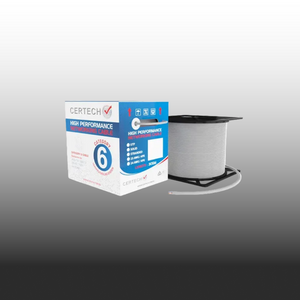
You are on the supplier site at 9pm on a Sunday. The job starts Monday. There are five Cat6A 305m rolls on the screen — U/UTP, F/UTP, S/FTP, LSZH, gel-filled — all 10 Gigabit, all 305 metres, all wildly different prices. You have already made the call to run Cat6A. Now you have to actually order it. This post is for the cabler at that decision point. Get the variant right and the install certifies clean, the GC signs off, and you go home. Get it wrong and you either lose performance, blow the budget, or worse — pull the wrong cable through a ceiling and replace it on your own dime. Here is the practical decision tree. Decision One: Shielding Type This is the single biggest cost lever and the one most cablers default-pick on autopilot. Shielding is not about future-proofing — it is about the electromagnetic environment the cable lives in. Match it to the site, not to the spec sheet. U/UTP — the workhorse for clean commercial Unshielded twisted pair. No foil, no braid — just four pairs of conductors with carefully controlled twist rates doing the work. This is the right call for general commercial offices, classrooms, retail tenancies, professional services fit-outs, and any space where the cable tray is well-separated from power runs and there is no significant industrial gear nearby. U/UTP is lighter, easier to terminate, faster to pull, and cheaper. If the EMI environment is benign, the foil is doing nothing useful — you are paying extra for shielding the site does not need. F/UTP — the default upgrade for real commercial sites An overall foil shield wraps all four pairs together. F/UTP is the cable for sites where the data path runs near power conduits, lift shafts, plant rooms, switchboards, fluorescent or LED driver-heavy lighting, or any space with moderate electromagnetic noise. On most multi-storey commercial fit-outs, F/UTP is the right specification — the riser stack alone usually justifies it. If a project spec says "shielded Cat6A" without specifying which type, F/UTP is almost always what they mean. It is the industry default for commercial. S/FTP — for severe EMI environments Overall braided shield plus individual foil-wrapped pairs. This is the heavy artillery — designed for environments where standard shielded cable still cannot keep the noise out. Specify S/FTP for data centres with dense rack-to-rack runs, healthcare imaging suites near MRI or CT, industrial and manufacturing sites with variable speed drives, water treatment plants, and any defence or government install where the spec calls for it explicitly. S/FTP is harder to terminate, takes longer per drop, and costs more. Do not spec it for an office fit-out — it is overkill that slows the job. Quick Shielding Reference: U/UTP: General commercial, clean office, classroom, retail. From $323 inc GST F/UTP: Mainstream commercial, riser routes, near power. From $370 inc GST S/FTP: Data centres, hospitals, industrial, government. From $406 inc GST Earth bonding: Any shielded cable requires shielded patch panels and end-to-end shield bonding per AS/NZS 3000. Ungrounded shield = useless Decision Two: Jacket Type The jacket determines where the cable can legally and safely live. Pick wrong and you fail inspection — or worse, you pass inspection but create a fire-load problem someone else has to discover later. Three jacket types matter on a commercial job. Standard PVC — general indoor only Cheaper, fine for general indoor commercial work where there is no fire-egress or smoke-spread requirement. Limited use on most modern commercial sites because Australian fire codes increasingly require LSZH for any cable in plenum spaces, risers, or common-egress zones. LSZH — the commercial standard Low Smoke Zero Halogen. When this cable burns it produces minimal toxic smoke and no halogen acid gas. That matters in any space where building occupants need to evacuate — risers, plenum ceilings, fire-rated zones, hospitals, schools, and government buildings. If the project specification references AS 1530.3 (early fire hazard properties), AS/NZS 3080, or a building code requiring restricted smoke output, LSZH is mandatory. Most modern commercial fit-outs in Australia spec LSZH by default — and every Cat6A indoor roll SparkyZone stocks is LSZH-jacketed for exactly this reason. Gel-filled — for underground and damp environments Petroleum jelly fills the cable core. If the outer jacket is nicked or damaged, the gel stops water from migrating along the cable and reaching the conductors. This is the cable for direct-burial runs, sub-floor installations, and any path where moisture is a long-term risk — even in conduit, because conduit fills with condensation. Gel-filled cable is stiffer, messier to terminate, and not appropriate for indoor risers. Use it where it belongs: underground, sub-floor, or in damp plant rooms. Direct-burial gel-filled also typically does not require conduit (minimum 300mm depth applies). When LSZH is non-negotiable: If your cable passes through any of the following, you must spec LSZH — not "nice to have", required: Riser shafts: Vertical cable runs between floors Plenum ceilings: Return-air voids above suspended ceilings Egress paths: Corridors, stairwells, and emergency exit routes Healthcare and schools: Any building with vulnerable occupants Anywhere AS 1530.3 is called up: Read the cabling spec carefully before you order Side-by-Side: U/UTP vs F/UTP vs S/FTP Lay it out across the four things that actually matter on a job: Feature U/UTP F/UTP S/FTP Best environment Office, retail, classroom — low EMI Commercial fit-out, risers, near power Data centre, hospital, industrial EMI protection Twist rates only Overall foil shield Braid + individual pair foil Termination time Fastest — no shield to manage Moderate — shield drain to bond Slowest — braid plus pair foils Cable diameter (OD) ~7mm ~7.5mm ~8mm Roll cost (305m, LSZH) From $323 inc GST From $370 inc GST From $406 inc GST Earth bonding required No Yes — both ends Yes — both ends, every drop Decision Three: Colour Coding Colour is not just for aesthetics. On a commercial job with multiple network types running through the same trays, jacket colour is the fastest documentation system you have. The cabler in twelve months chasing a fault opens the patch panel, sees a yellow cable, and knows it is a security feed before they read a single label. There is no AS/NZS standard mandating colours, but there is a widely-adopted industry convention across Australian commercial cabling. Use it. Common Cat6A Colour Conventions: Blue: General data drops — workstations, printers, default LAN Grey: Voice and telephony (legacy convention, still common) White: Wireless access point feeds Red: PoE-powered devices, fire/BMS, or VoIP — depends on spec Yellow: Security, CCTV, or shielded/segregated networks Green: CCTV or out-of-band management Purple: AV systems and digital signage Orange: Fibre crossconnect copper or carrier demarcation Black: Backbone and inter-rack risers For a multi-network commercial fit-out — say, data plus security plus AV plus PoE lighting — order three or four different colours rather than running everything in blue. The labour cost difference is zero. The fault-finding cost difference, in year three, is hours per incident. Defence and government installs typically mandate specific colour schemes per network classification — always check the project ISM and ACSC guidelines first. How Many Rolls for the Job The formula every cabler should know cold: (Number of drops x average run length x 1.15 wastage) / 305 = rolls required, rounded up The 15% wastage covers service loops at both ends, mistakes, kinks that have to be cut out, and the fact that real ceiling routes are never as direct as the floor plan suggests. Use 10% only on greenfield slab-on-ground builds where every run is a clean straight pull. Typical Commercial Fit-Out Sizing: 20 drops, small office (~25m avg): 1 roll (with spare = 2) 48 drops, medium office (~30m avg): 2-3 rolls 100 drops, large fit-out (~35m avg): 5-6 rolls 200 drops, multi-floor (~40m avg): 11-12 rolls Long single runs (~80-90m): Roughly 3 runs per roll Conduit Sizing — Don't Skip This Cat6A cable is fatter than Cat6. The outer diameter is roughly 7-8mm depending on shielding, versus 6mm for typical Cat6. If the conduit was originally sized for Cat6 — or worse, sized for Cat5e on a brownfield job — that 25mm conduit you assumed would carry 24 cables now carries 16, and the cable will not pull cleanly past about 12. AS/NZS 3000 caps cable fill at 40% of the conduit's internal cross-section. Run the maths before you order, not after the cable arrives: Conduit Fill — Quick Reference (Cat6A at 7.5mm OD, 40% fill): 20mm conduit: ~3 cables maximum 25mm conduit: ~6 cables maximum 32mm conduit: ~10 cables maximum 40mm conduit: ~16 cables maximum 50mm conduit: ~26 cables maximum If the conduit is pre-existing and undersized, you have three options: split the run across two conduits, drop to U/UTP (the smallest OD), or talk to the head contractor before you start pulling. Do not try to overload a conduit — you will damage the cable and fail certification on insertion loss. Cost Reality on Multi-Roll Orders Two practical rules on the commercial side of ordering Cat6A in volume: Rule one: order the spare. If the calculation says five rolls, order six. Returning an unopened roll on a finished job is a five-minute conversation. Stopping a cabling crew because you ran 4 metres short on the last drop costs you a half-day in mobilisation and a phone call to the GC you do not want to make. Rule two: ask about volume pricing. SparkyZone trade pricing on three or more rolls of the same SKU drops. If you are quoting a 100+ point install or a multi-floor fit-out, email the order through to sales@sparkyzone.com.au with your BOM rather than ordering through the cart — same-day response, sharper pricing on bulk. Ordering tip — buy the spare roll. The cost of a returned unused 305m roll is zero. The cost of a second courier delivery holding up a cabling crew is half a day of labour plus a frustrated head contractor. Round up, every time. Free shipping kicks in at $300 — every Cat6A roll exceeds this on its own, so multi-roll orders ship free Australia-wide. Putting It Together Three decisions, in order, every time: ✓ Shielding: Match the EMI environment. Office = U/UTP. Commercial fit-out near power = F/UTP. Industrial, healthcare, data centre = S/FTP ✓ Jacket: Indoor riser, plenum, or fire-rated zone = LSZH. Underground or wet = gel-filled. Standard PVC only where the spec allows it ✓ Colour and quantity: Order multiple colours for multi-network jobs, calculate at 15% wastage, round up, and always order the spare Get those three right and the install certifies first time. The infrastructure serves the building for two decades. The GC signs off, the client pays the invoice, and you do not see that ceiling again. Order Your Cat6A Rolls at SparkyZone U/UTP, F/UTP, S/FTP, external and gel-filled — all 305m, all 10 Gigabit, all LSZH-jacketed indoor variants. Free shipping Australia-wide on every roll. Same-day dispatch before 2pm AEST. ABN invoiced for trade accounts. Shop Cat6A Cable Rolls → Shop Cat6 Cable Rolls → Quoting a multi-roll order? Email sales@sparkyzone.com.au with your BOM for sharper trade pricing.
Read article
Cat6 vs Cat6A: Which Cable for Your Next Commercial Install?
You are halfway through quoting a commercial fit-out. The client asks the question you knew was coming: "Cat6 will be fine for this, won't it? It's cheaper." You hesitate. The runs are long, the comms room sits next to the main switchboard, and the spec sheet uses the word "future-proof" three times. Pick wrong here and you are not just losing margin — you are coming back in twelve months to re-pull every cable through a finished ceiling. There is already a thousand articles online explaining the difference between the two cables. This is not one of them. This is the practical decision rule for a working cabler quoting a commercial job in Australia today. The Difference That Actually Matters On Site Forget the bandwidth charts for a moment. On a commercial site, two things separate Cat6 from Cat6A in a way you can feel — and both of them show up only after the cable is in the ceiling. 1. Alien crosstalk on long runs Cat6 can carry 10 Gigabit, but only over short distances — and only when it is not bundled tightly with other Cat6 runs in a tray. Push it past about 37 metres bundled, and signals from neighbouring cables start bleeding into each other. This is alien crosstalk (AXT), and it is the single biggest reason Cat6 fails certification on commercial 10G installs. Cat6A is engineered specifically to suppress AXT — tighter twist rates, larger conductor separation, and on shielded variants, a foil or braid that kills the interference outright. That is why it is the standard for any commercial 10G run, regardless of whether the client plans to switch to 10G this year or in five years' time. The 37-Metre Rule (technical reality): Cat6 at 10G: Reliable only to ~37m when bundled (55m unbundled, lab conditions) Cat6 at 1G: Full 100m channel — no problem Cat6A at 10G: Full 100m channel, bundled or not — guaranteed to AS/NZS 3080 AXT testing: Required for Cat6A certification, not specified for Cat6 Bundled cable count: AXT scales with bundle density — a 24-cable run is far worse than 6 2. Shielding in high-interference environments Commercial sites are noisy. Cable trays running parallel to power conduit, comms rooms sharing a wall with the main switchboard, plant rooms with VSDs and contactors firing all day — all of it dumps EMI into your data cables. Unshielded Cat6 will pick up that noise and your throughput will tank long before anyone calls in a fault. For these environments you want shielded Cat6A — F/UTP for general commercial work, S/FTP where the interference is severe (data centres, near major plant). The shield does the heavy lifting, the AXT performance does the rest. Cat6 vs Cat6A — Quick Comparison Specification Cat6 Cat6A Max speed 1 Gbps (100m) / 10 Gbps (37m bundled) 10 Gbps (full 100m) Max distance at 10G ~37m bundled 100m — guaranteed Alien crosstalk (AXT) Not tested — fails in dense bundles Engineered to suppress AXT Shielding options U/UTP only (standard) U/UTP, F/UTP, S/FTP Cable diameter ~6mm OD — fits tight conduit 7–8mm OD — needs larger conduit Typical cost (305m roll) Lower — good for budget installs 15–25% more — worth it for commercial AS/CA S008 compliance Category C channel Class EA channel — commercial standard Best for Residential, short runs, retrofit, voice/CCTV Commercial, long runs, 10G, PoE++ The Decision Rule (Keep It Simple) When you are sitting in front of a quote and the client wants a straight answer, run the job through this. It is not theory — it is what stops you driving back out for a callback. Spec Cat6A — no question — when: ✓ It is a commercial fit-out (offices, retail, education, healthcare, government) ✓ Any single run is over 37 metres ✓ Cables run near electrical conduit, switchgear, or plant ✓ The client has 10G, Wi-Fi 6E/7 access points, or PoE++ devices in scope — now or in the next 5 years ✓ The contract or specification calls for AS/CA S008 compliance ✓ The cable is going somewhere you cannot easily get back to When Cat6 is still the right call: Cat6 is not dead. There are jobs where speccing Cat6A would be over-engineering and the client would be right to push back on the price. Residential and small home office runs under 37 metres Small-business fit-outs where 1G is the ceiling and budget is tight Retrofit work where existing conduit cannot fit Cat6A's 7–8mm OD Voice runs, CCTV at standard PoE, point-of-sale and alarm cabling Underground or external runs where the right tool is gel-filled or external-rated Cat6 (Cat6A external options exist but are limited) AS/CA S008 — The Compliance Bit You Cannot Ignore AS/CA S008 is the Australian customer cabling standard, sitting alongside AS/NZS 3080 for performance. For new commercial builds and major refurbishments, the project specification will almost always call out a minimum cable category. Increasingly that minimum is Cat6A. If your contract specifies Cat6A and you install Cat6 to save margin, three things happen — and none of them are good. The site fails certification when the head contractor's tester comes through. You are non-compliant against the contract, which puts you on the hook for the rectification. And if it is a Defence, education, or government job, you have just put your prequalification in jeopardy. Compliance warning — read your spec sheet: Watch for: "AS/CA S008", "AS/NZS 3080", "Class EA channel", "10GBASE-T support" Class EA channel = Cat6A cable, connectors and patch leads. Mixing Cat6 components with Cat6A cable will fail certification Government and Defence work increasingly mandates Cat6A as the minimum — confirm before quoting Head contractor testing uses a Fluke DSX or equivalent — there is nowhere to hide a Cat6 cable trying to pass as Cat6A If in doubt: price the job in Cat6A and walk the client through why. Margin lost on a callback is far worse than margin lost on a quote Winning the "Future-Proof" Conversation Every cabler has had this conversation. The client looks at the line item, sees the gap between Cat6 and Cat6A, and says some version of "we don't need 10 gig — Cat6 will do." Here is how to answer it without sounding like you are upselling. Frame it as the cost of the cable, not the speed of the network. The client is buying installed infrastructure that will sit in their ceiling for 20–25 years. Switching gear gets replaced every 5–7 years. Wireless access points get replaced every 4–5. The cable is the only thing in the network that does not get touched. Speccing Cat6A adds maybe 15–25% to the cable cost on a typical fit-out — which works out to a small fraction of the total job once you factor in labour, terminations, patch panels, racks and certification. Make the labour argument. The cost of pulling a cable is the labour, not the spool. If you have to come back in eight years and re-cable the building because Cat6 cannot carry the next generation of access points, the labour bill alone will dwarf what they "saved" today. Use the PoE angle. Wi-Fi 6E and Wi-Fi 7 access points draw more power than the 802.3at standard (PoE+) Cat6 was designed around. PoE++ (802.3bt, up to 90W) generates real heat in the cable jacket. Cat6A's larger conductors handle that heat properly; thin Cat6 conductors under continuous high PoE load will degrade and start producing errors. The client does not need to know the standard numbers — they just need to know "your Wi-Fi will work properly in five years." Pick The Right Cat6A For The Job Once you have decided on Cat6A, the next call is the construction. Get this right and certification is a formality. Get it wrong and you have over-spent on shielding the job did not need, or under-spec'd a cable that is going to fail in a noisy environment. Cat6A construction — quick reference: U/UTP (unshielded): General commercial offices, classrooms, retail. Easiest to terminate, lowest cost. LSZH jacket for indoor riser and plenum routes. F/UTP (foil shield): Commercial sites with moderate EMI — near power runs, lift shafts, plant rooms. The default upgrade when you want extra insurance without the cost of full S/FTP. S/FTP (foil + braid): Data centres, healthcare imaging suites, industrial sites with VSDs and motors. Maximum shielding, maximum AXT margin. Gel-filled U/UTP: Underground conduit, sub-floor where moisture is a risk. The gel blocks water ingress and protects the conductors. External (above-ground) S/FTP: Outdoor runs between buildings, pole-to-pole, exposed risers. UV-stable jacket plus full shield. Quoting a job that needs S/FTP? 305m Cat6A 10G S/FTP Cable Roll — $439 inc GST Double-shielded S/FTP with foil on every pair plus an overall braid, LSZH jacket, solid core with strength member and drain wire. The construction this article just described — in stock in Australia, dispatched same day. View the Cat6A S/FTP Roll → AU stock • ABN invoicing • Same-day dispatch before 2pm AEST • Free shipping over $300 Cost Reality Check The price gap between Cat6 and Cat6A is real — but it looks different once you factor in the full job. $ Upfront cable cost: Cat6A adds roughly 15–25% to the cable line item on a typical commercial job. On a 20-drop office install using 4 x 305m rolls, that difference is a few hundred dollars — not thousands. ⚒ Labour cost is the same: Pulling, terminating, and certifying Cat6A takes the same time as Cat6. The cable itself is the only cost difference at install time. 📅 Long-term value: Commercial cabling stays in the ceiling for 20–25 years. Network gear turns over every 5–7 years. The cable outlasts three generations of switches — spec it for the third generation, not the first. ⚠ When to upgrade existing Cat6: If a client is doing a major fit-out, floor expansion, or full network refresh — upgrade now. Spot-replacing individual runs in an existing Cat6 installation is rarely worth it unless you are adding 10G uplinks or the current runs are failing certification. Bottom Line If you are quoting a commercial fit-out in Australia in 2026, Cat6A is the default. The runs are too long, the PoE loads are too high, the compliance environment is too tight, and the cost of being wrong is too expensive. The decision is not "Cat6A vs Cat6" anymore — it is "Cat6A or a callback." Cat6 still has its place — short runs, residential, retrofit, voice and CCTV. But for a commercial install where the client has any expectation that the network will still be running 10 years from now, you spec Cat6A, you walk them through why, and you charge accordingly. Ready to order? SparkyZone has it in stock. Australian stock, ABN-invoiced, same-day dispatch before 2pm AEST, free shipping over $300. Full Cat6A range — U/UTP, F/UTP, S/FTP, gel-filled, and external variants in every colour you need for a commercial fit-out. Shop Cat6A Cable Rolls → Shop Cat6 Cable Rolls → Trade account? Email sales@sparkyzone.com.au for project pricing on multi-roll orders.
Read article